
 League of Legends
 FortniteBeta
 CS2Beta
 DeadlockBeta
How to post gaming clips that people watch to the end
A gaming clip gets watched when the first second already shows the moment, it covers one moment and nothing else, and it ends on the payoff. Everything else is detail on those three rules.
Say you finish a two hour session with one great fight in it. The clip that works is not the two minutes around the fight. It's the fight, from the second before it starts to the second it's won. That's the whole guide in one line, and the rest is how to get there.
The first two seconds
People decide fast on a Shorts or Reels feed. YouTube even counts it for you: Shorts analytics show how many people viewed your Short against how many swiped away, so you can see whether your opening is working.
- Start on movement. A clip that opens on a walk to lane, a loot screen or a buy menu loses people before anything happens. Move the start until the first frame is already the fight.
- Show the stakes on screen. A low health bar, a 1v3, the last circle. If the viewer can see why it matters, they stay.
- Put the hook in text too. Most people scroll with the sound off. A short line on screen does what your voice can't.
One moment per clip
A clip is one fight, one play or one reaction. If you've got three good moments, that's three clips, and three days of posts.
- Fights stay together. A double kill or a squad wipe is one moment. Cut it as one clip.
- Cut the walk away. End on the kill, the win or the reaction. A clip that runs into a respawn timer or a scoreboard gets swiped.
- Say no to the montage. A montage asks for a minute of attention up front. One moment asks for ten seconds.
How long a clip should be
As long as the moment and no longer. The platforms give you room: YouTube counts square and vertical videos up to three minutes as Shorts, and Instagram won't recommend Reels over three minutes to people who don't follow you. Most single fights fit well under that. Test the length on your own channel, because what works for one game and one audience won't match the next.
Hooks that work
The hook is the reason to keep watching. Bold and specific beats bold and vague.
- Name the situation. "1 HP, last circle, two left" or "1v3, no kit, 20 seconds" tells a player of that game exactly why to stay.
- Name the matchup. In League, "Garen vs Darius, level 3" pulls in everyone who plays that lane.
- Skip the begging. "Watch until the end" doesn't add tension. The moment does.
There's a full guide on how to write a hook with examples and a way to check if it worked.
Captions and the frame
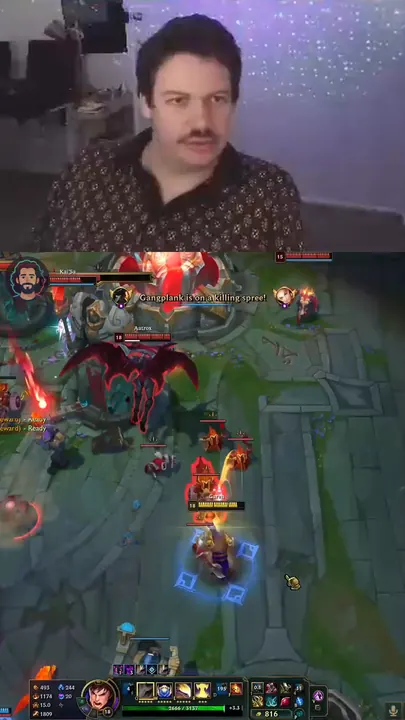
Most people watch on a phone held upright, so the clip needs to work at 9:16.
- Camera on top, gameplay below. If you stream with a camera, the split keeps your face and the action both readable. The guide on putting your face on top and gameplay below has the exact sizes.
- No camera? Use the full frame on a blurred background. Nothing important gets cropped off.
- Keep text off the action. Captions and hook text sit above or below the fight, not on top of it.
Per game notes
League of Legends
Clip the outplay, the skirmish you swing or the steal. Name the matchup in the hook. More on the League page and in what to clip from a League stream.
Fortnite
Clip the box fight, the squad wipe or the endgame. Drop the landing and the loot. More on the Fortnite page.
CS2
Clip the clutch, the multi kill or the flick. Show one second of setup so the viewer sees the angle. More on the CS2 page.
Deadlock
Clip the pick, the team fight you swing or the objective fight. Pick moments that read without knowing the heroes. More on the Deadlock page.
Quick check
If a clip isn't getting watched, open the viewed vs swiped away number and look at the first two seconds before you change anything else. Most of the time that's where the fix is.
What's in it for you
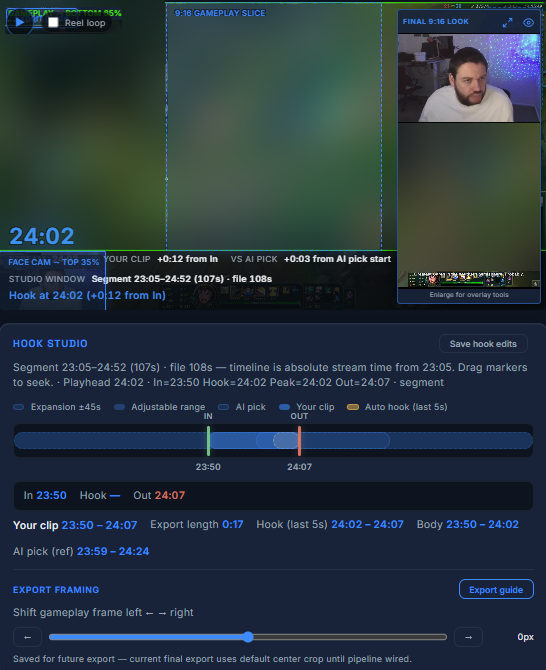
Finding the moment is the slow part. TCG Machine reads the game on screen to find your kills, opens each one as a clip, and lets you set the start, the end and the hook before you approve it. It drafts the title, the description and the thumbnail text too. You still make every call.
 Opens full size in a new tab.
Sources, checked 17 November 2026: YouTube Help, three minute Shorts, Instagram, Reels, YouTube Help, content reach and engagement.
Frequently asked questions
How long should a gaming clip be?
As long as the moment and no longer. YouTube counts vertical videos up to three minutes as Shorts and Instagram recommends Reels up to three minutes to new people, but most single fights fit well under that.
What should the first second of a gaming clip show?
The action. Move the start until the first frame already shows the fight or the stakes, not the walk to it.
Should I post one moment or a montage?
One moment. A single fight asks for a few seconds of attention, and a montage asks for a minute up front.
How do I know if my hook works?
On YouTube, check the viewed vs swiped away number for the Short. If a lot of people swipe away, change the first two seconds first.
Do I need captions on gaming clips?
A line of text on screen helps, because many people scroll with the sound off. Keep it off the action.
What layout works best for gaming Shorts?
Camera on top and gameplay below if you stream with a camera, or the full frame on a blurred background if you don't. Both work at 9:16.
Does TCG Machine pick the clips for me?
It finds your kills and opens them as clips. You set the start, the end and the hook, and you approve or skip every one.