
 League of Legends
 FortniteBeta
 CS2Beta
 DeadlockBeta

TCG Machine for Deadlock Beta
A Deadlock clip maker for your kills and objective fights
Your kills, your assists and the objective fights, cut and ready to post.
TCG Machine finds your own kills and assists in a Deadlock recording, plus objective fights, and turns them into vertical Shorts with a title, a description and thumbnail text. Deadlock is in beta and tuned on 1080p recordings, so mistakes can happen: you check each clip before you post, and nothing goes out without your yes. Join the beta to get a key and the download.
Deadlock matches are long, and the swings come out of nowhere: a pick in the lane, a fight at the mid boss, a push that ends it. TCG Machine finds those moments so you don't scrub for them.
How it finds Deadlock clips
It reads what the game shows on screen, not the volume of the recording.
- Your kills and assists. Each one opens a clip, and kills close together share one clip.
- Objective fights. Deadlock clips can also come from objective fights, because a lot of the game is decided there.
- Recorded at 1080p. Deadlock is tuned on 1080p recordings.
- Beta means check. Deadlock is in beta. Look at each clip before you post it.
What you need
- Windows 10 or 11, 64-bit. No graphics card required.
- Any raw MKV or MP4 recording, from OBS, Streamlabs or any software that saves those files. 1080p works best for Deadlock.
- An internet connection for titles and descriptions. The full list is on what you need.
What TCG Machine does with your Deadlock recording
-
01
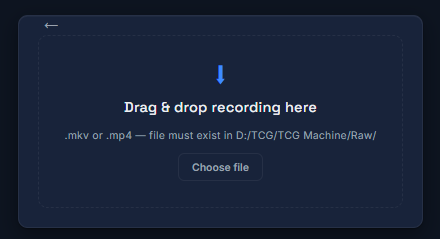
Drop in your Deadlock recording.
TCG Machine finds your own kills and assists in the recording, plus objective fights. Kills close together share one clip.
 Opens full size in a new tab.
-
02
Cut it tight. Land the hook.
Each moment opens in Hook Studio. Set where the clip starts, where it ends and where the hook lands, then approve it or skip it.
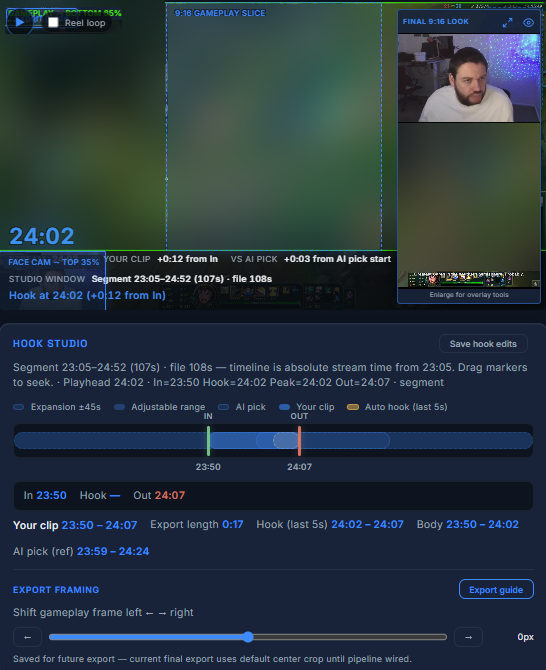 Opens full size in a new tab.
-
03
Thumbnail text and a title, drafted for you.
Pick a thumbnail line or type your own. The title and description are already written, so you edit words instead of starting from nothing.
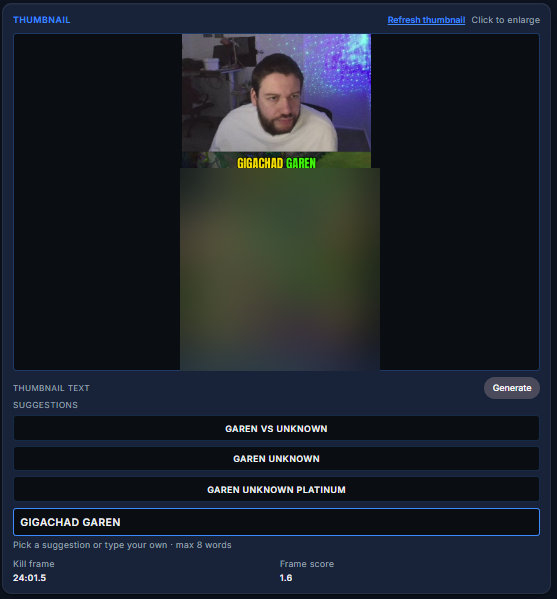 Opens full size in a new tab.
-
04
Schedule it or post it.
YouTube can be scheduled from the app. Facebook and Instagram open Meta Business Suite. TikTok is a manual upload.
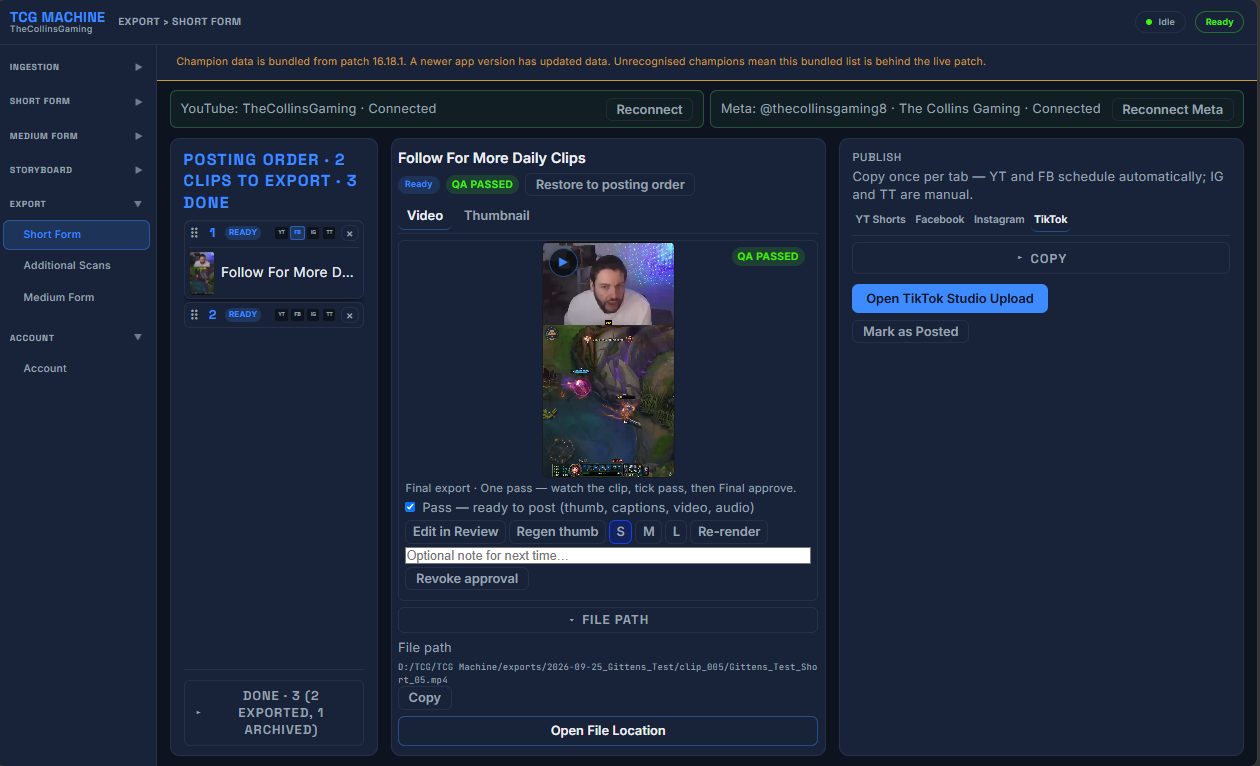 Opens full size in a new tab.
The app screens are shown with a League of Legends recording. The steps are the same for Deadlock.
What it did for TheCollinsGaming
TheCollinsGaming built TCG Machine for their own League of Legends channel and went from 1 to 2 posts a week to 2 posts per day, every day since July 15 2026.
That is their result, on League. It is not a promise for your channel.
How to post Deadlock clips
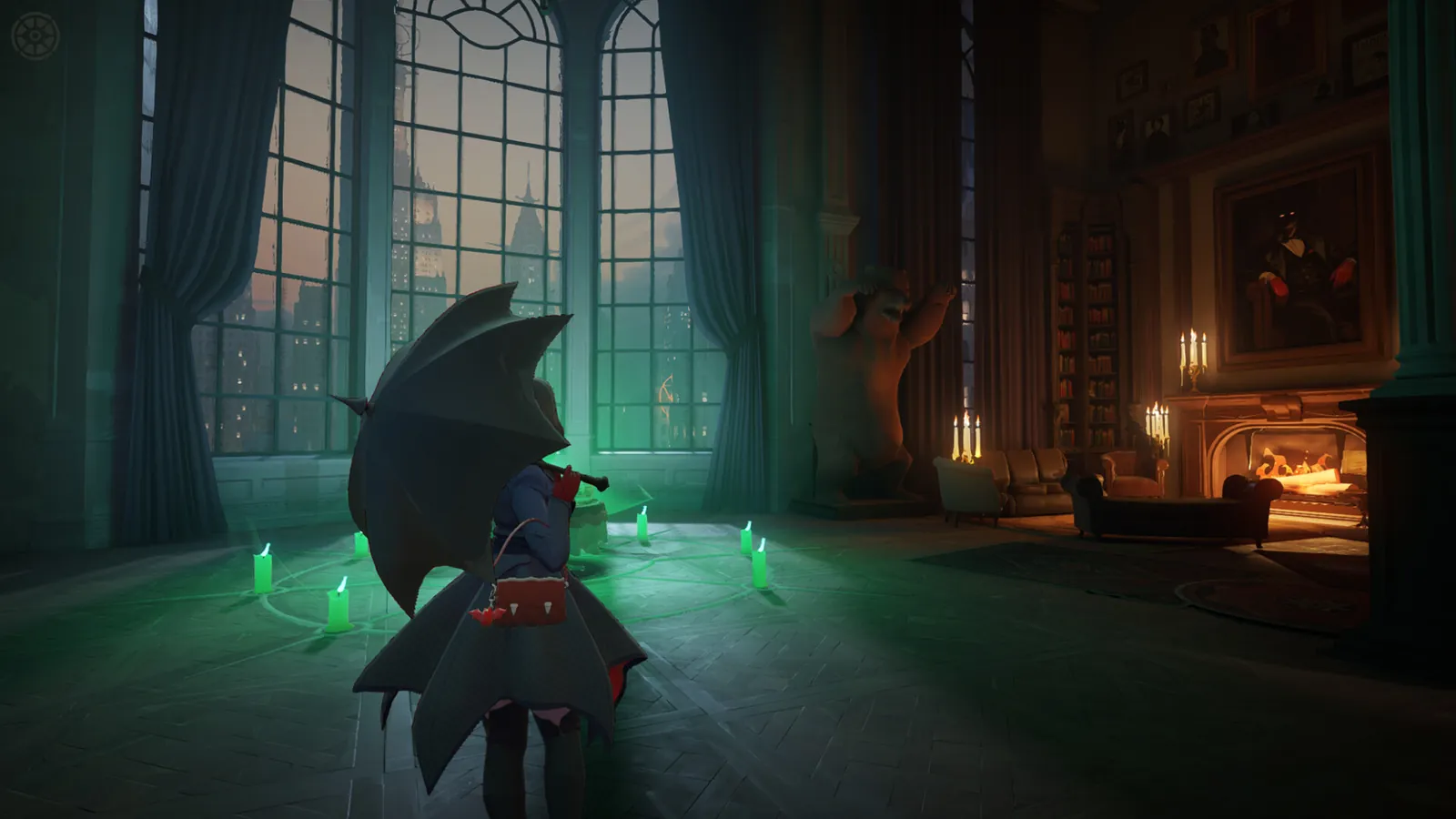
The short version: one fight, one clip, and a viewer should see what's at stake in the first second. Deadlock is new to a lot of people scrolling, so the clip has to read without knowing the heroes.
What to clip
- Picks. Catching someone alone in the lane is the easiest Deadlock clip to understand.
- Team fights you swing. The ult that wins the fight. Kills close together stay in one clip.
- Objective fights. The fight at the mid boss or a guardian, where the game turns.
- Movement plays. A slide, a zipline escape or a dash that leaves them behind.
Hooks that work for Deadlock
Say what's at stake, not the hero's lore. "Their whole team at the mid boss, I had one ult" makes a Deadlock player stay. The thumbnail line does the same in a few words. More on this in how to write a hook.
Length
Objective fights run longer than a single pick, and that's fine. YouTube counts square and vertical videos up to three minutes as Shorts, and Instagram won't recommend Reels over three minutes to new people. Trim the walk in and keep the fight.
The frame
Camera on top and gameplay below works on a phone. TCG Machine builds it from where your webcam sits in the recording, and you slide the gameplay left or right to keep the fight in frame. No camera gets the full frame on a blurred background.
Where Deadlock clips do best
Post the same clip to YouTube Shorts, TikTok, Instagram Reels and Facebook, then watch which one your audience lives on. TCG Machine schedules YouTube from the app and opens Meta Business Suite for Facebook and Instagram. TikTok is a manual upload.
Sources, checked 17 November 2026: YouTube Help, three minute Shorts and Instagram, Reels.
Hashtags for Deadlock
Copy a set, paste it under your caption, and swap one tag for your own channel tag. Why four, and what each platform does with them, is in the guide to titles, descriptions and hashtags.
YouTube Shorts
#Deadlock #DeadlockGame #Valve #GamingClips
TikTok
#deadlock #deadlockgame #valve #gamingclips
Instagram and Facebook Reels
#deadlock #deadlockgame #gamingclips #gamer
Tips and tricks for Deadlock creators
Open on the engage
Start a beat before the fight, not on the walk to it. Hook Studio moves the start until the first second is already the fight.
Trim long objective fights
Objective fights can run long. Cut the waiting at the start and keep the swing.
Record at 1080p
Deadlock is tuned on 1080p recordings in TCG Machine, so record at 1080p if you can.
Keep the HUD clear
TCG Machine reads the game's on screen information. Keep your camera and alerts off the HUD.
Explain nothing, show everything
Plenty of viewers don't know the heroes yet. Pick clips that read without the names.
Check every clip
Deadlock is in beta in TCG Machine. Watch each clip before you post it, and skip the ones it got wrong.
Who it's for
Scenarios, not testimonials. Each one is a kind of Deadlock creator TCG Machine is built for, and what it changes in their week.
The hobbyist
Who: picked up Deadlock with friends and loves it. Their week: the best fights of the night are never seen again. What changes: the kills and fights from the session are clips waiting for a yes.
The grinder
Who: plays every day and records every match. Their week: long matches, a few great fights, no time to find them. What changes: the fights are found for them, and the rest is skipped.
The artist
Who: cares how the clip looks, and Deadlock looks great. Their week: half the time goes on finding the moment before any styling. What changes: a clean, cut, vertical starting point to make their own.
The parent who plays
Who: gets one or two matches in at night. Their week: the choice is editing or sleeping. What changes: approving clips takes minutes, so posting doesn't eat the evening.
The entrepreneur
Who: building a channel around a newer game while it's growing. Their week: needs clips out daily without an editor. What changes: a steady supply of vertical clips from recordings they already make.
The established streamer
Who: streams Deadlock to an audience. Their week: clipping long sessions is the job that never gets done. What changes: the cutting, titles and scheduling are handled, so the time comes back to them.
Everything you need
Deadlock guides
- How to post Deadlock clipsWhat to clip, hooks that work and where Deadlock clips do best. On this page.
- Tips for Deadlock creatorsMoments to always clip, what to cut and how to open the first second. On this page.
- Starter kit for a new Deadlock creatorRecord Deadlock at 1080p, clip picks and objective fights, title what is at stake, and keep a weekly routine. Your first 10 Deadlock clips, planned.
Posting guides
- How to post gaming clips that people watch to the endOpen on the action, keep it to one moment, end on the payoff. Hooks, length, captions and the first two seconds for League, Fortnite, CS2 and Deadlock.
- Where to post your gaming clipsPost the same vertical clip to YouTube Shorts, TikTok, Instagram Reels and Facebook, then let your own numbers pick a favourite. What each one is good for.
- When to post gaming clipsPost on a schedule you can keep, use your own analytics for the time of day, and post around patches, seasons and big events. What is sourced, what to test.
- Titles, descriptions and hashtags for gaming ShortsWrite titles people search for, descriptions that say what happens, and four hashtags per clip. Copy ready sets for League, Fortnite, CS2 and Deadlock.
- How do creators make a hook for a clip?A hook is what the first three seconds of your clip show and say. Six steps to write one, with League examples and how to check if it worked.
- Record horizontal. Crop vertical later.Should you record vertical or horizontal in OBS for Shorts and Reels? Record wide, crop later. The real cost of each route, with the numbers.
- How to put your face on top and gameplay below in a vertical clipBuild a 9:16 split with your camera on top and gameplay below. Six steps in OBS, with the real pixel sizes and what the crop costs you.
- The facecam split for Shorts and ReelsThe facecam split puts your camera on top and gameplay below in a 1080×1920 frame. 35% camera, 65% gameplay, and you can slide the gameplay left or right.
- From OBS recording to a posted ShortHow to get from an OBS recording to a vertical Short or Reel: record wide, find the moment, build the frame, add the hook, post. Where TCG Machine fits.
- TCG Machine and CapCut: use bothTCG Machine finds League moments and builds vertical 1080×1920 clips. CapCut finishes them. What each does, what to hand to which, and the honest gaps.
- TCG Machine vs editing every clip by handAn honest look at cutting League clips by hand versus using TCG Machine: what each does, what you still do, and the numbers from my own channel.
Recording and OBS
- OBS recording format: MKV or MP4?Which recording format to pick in OBS in 2026, how to switch it in Settings, and how to remux an MKV to MP4. Five steps, about three minutes.
- My mic is too low: how to fix it in Windows and OBSQuiet mic on stream? Raise the Windows input volume, add a Gain filter in OBS, and check the meter. Five steps, about five minutes.
- Why does my lighting suck on stream? How to fix itBad stream lighting usually means one light in the wrong place. Put a key light 45 degrees off, add a half strength fill, and set your webcam manually.
- How to make a good background for your face camA good face cam background is clean, slightly darker than your face, with one lamp for texture. Six steps, plus the OBS green screen settings.
Frequently asked questions
Does TCG Machine work with Deadlock?
Yes, in beta. It finds your own kills and assists, plus objective fights, and turns them into vertical Shorts. Mistakes can happen, so check each clip before you post.
What does TCG Machine clip in Deadlock?
Your own kills and assists, and objective fights. Kills close together share one clip.
What resolution should I record Deadlock at?
1080p. Deadlock is tuned on 1080p recordings.
Does it clip my teammates' kills?
No. Clips open on your own kills and assists, and on objective fights.
Does TCG Machine post my Deadlock clips for me?
Only when you say so. You approve every clip. YouTube can be scheduled from the app, Facebook and Instagram open Meta Business Suite, and TikTok is a manual upload.
Is it free?
It's free to download and free during the beta. AI titles and descriptions use a licence with a monthly allowance. See pricing.
Get your Deadlock clips out.
Join the beta. Confirm your email and you get a key and the download link while places last.