 League of Legends
 FortniteBeta
 CS2Beta
 DeadlockBeta
Starter kit for a new Fortnite creator
Starting a Fortnite channel comes down to five things: record clean, clip the fights and skip the rest, post one moment per clip, name the situation in the title, and keep a routine you can hold for a month. This kit covers each one and plans your first 10 clips.
A Fortnite match is mostly landing, looting and rotating, and the part worth posting is a few seconds of building and shooting. That's good news. Every match you play has a clip in it somewhere.
1. Record it properly
- Use OBS or Streamlabs and record MKV. It survives a crash. See MKV or MP4.
- Record horizontal, crop vertical later. You choose the crop per clip. See record horizontal or vertical.
- Keep your eliminations counter on screen. Don't park your camera or an alert box on top of it.
- Fix your mic and lighting once. Mic too low and lighting cost every clip.
2. What to record
Record every session, including the games you lose early. A clean box fight in a game you lost is still a great clip.
3. Your first 10 clips
- Your cleanest box fight. The edit that wins it is the clip.
- A squad wipe. Several eliminations close together, one clip.
- A third party you clean up. Two teams fighting, you finish both.
- An endgame win. The last circles and the last few players.
- A clutch revive. You get your teammate up under fire.
- A snipe across the map. One clean shot is a whole clip.
- A build battle you win. Show the build and the finish.
- A funny fail. Your reaction is the hook.
- A new season moment. A new weapon or map spot in its first days.
- Your best mechanic. The thing you're good at, shown once, clearly.
4. Titles and thumbnail text
- Name the situation. "1 HP, last circle, two left."
- Thumbnail text in five words or less. The stakes, not the outfit.
- Description: what happens, your handle, four hashtags, a link. The full method is in titles, descriptions and hashtags for gaming Shorts.
YouTube Shorts
#Fortnite #FortniteClips #Gaming #GamingClips
TikTok
#fortnite #fortniteclips #fortnitebuilding #gamingclips
Instagram and Facebook Reels
#fortnite #fortniteclips #gamingclips #gamer
5. A weekly routine you can hold
- Play as normal and record everything.
- One clipping session a week. One sitting for the whole week's recordings.
- Approve one clip per day you want to post. Skip the rest.
- Schedule the week.
- Post around new seasons. People are looking for the new map and loot in the first days. More in when to post gaming clips.
 Opens full size in a new tab.
How TCG Machine fits in
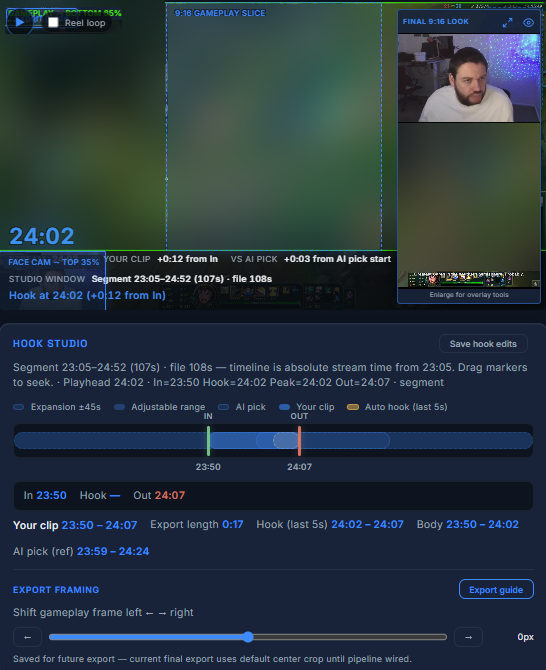
Fortnite is in beta in TCG Machine. It reads your eliminations counter, opens a clip when it goes up, and keeps eliminations close together in one clip. You set the start, the end and the hook, it drafts the title, description and thumbnail text, and you approve every clip. Mistakes can happen in beta, so check each clip before you post. See the Fortnite page.
Frequently asked questions
What should a new Fortnite creator clip first?
Your cleanest box fight, a squad wipe and an endgame win. They're easy to watch without context.
What should I cut from a Fortnite clip?
The landing, the looting and the walk away. Start on the fight and end on the elimination.
How do I title a Fortnite clip?
Name the situation, like "1 HP, last circle, two left".
How many hashtags should I use on a Fortnite Short?
About four, like #Fortnite #FortniteClips #Gaming #GamingClips.
When should I post Fortnite clips?
On a schedule you can keep, and lean in during the first days of a new season, when people are looking.
Does TCG Machine work with Fortnite?
Yes, in beta. It finds your own eliminations and opens them as clips. Check each clip before you post.